 Printwear & Promotion The Total Promotional Package
Customer experience manager at Amaya Sales UK, Steve Poole, delivers tips on how to maintain your printhead to the max.
A DTF, direct to film, printer is a powerful addition to your garment decoration business as you are in complete control of your digital transfer production.
Being able to print transfers on demand at any time in any quantity for your customer will in many cases set you ahead of your competitors. But it’s no good if your printer is subject to downtime and maintenance problems.
The most important thing to look after is the print head. It is by far the most important component you have in terms of cost and keeping your production running and the quality on point. Your nozzles need to stay clean and unblocked. To prevent nozzles clogging in the first place, it is important to understand what cause nozzles to block.
Expired inks
The chemical makeup of the ink can change once the ink has passed its expiry date causing the fluidity of the inks to change and block the head.
Improper maintenance
If the printer is not maintained as per the manufacturer’s guidelines, excess dried ink can prevent the print head from capping correctly, resulting in dried nozzles and allowing air into the system. A build-up of ink on the wiper can push dried ink particles into the nozzles.
Environmental conditions
Working the printer outside of spec can change the viscosity of the ink, leading to nozzle clog etc. Low humidity dries out the print head.
Infrequent use
If a printer is left idle for a lengthy period you run the risk of the print head nozzles drying out, even with white ink recirculation.
If you experience missing nozzles, it is important to understand the different type of missing nozzles as they may all have different causes.
As a general rule of thumb, the following are the basic steps to follow when you experience missing nozzles, however, there are some additional items to check depending on the type of nozzle clogging you have.
- Check the environmental conditions.
- Check the ink expiry dates.
- Check the manual maintenance, capping station, wiper blade and around the print head.
- Run a series of head cleans, each one followed by a nozzle check to monitor the progress. The number or type of missing nozzles will determine the type of head clean you run.
Deflecting nozzles
This is when the nozzle check pattern is complete with each of the individual lines, however, they are not all parallel which can still result in banding within the print.
Deflecting nozzles are usually an indication that there is dried ink somewhere around the capping station, wiper blade or on the surface of the head. It is important that any build-up of ink is removed, and regular cleaning cycles are performed on the printer. Running a head soak is an effective way to loosen up any dried ink on the print head surface.
Missing nozzles
This is when there are gaps in the nozzle check pattern. If there are only a few missing nozzles, there’s a good chance that this will not affect print quality and they will recover during regular printing.
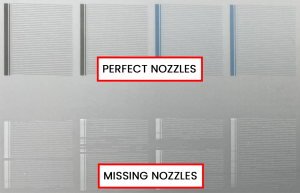
If there are a lot of missing nozzles, follow the basic steps as suggested above. If you are unable to obtain a perfect nozzle check, you want to compare the different nozzle check patterns you have printed.
If it is the same nozzles that are missing each time, this is suggesting a blocked nozzle which may be recoverable by running a ‘head soak’ with cleaning solution.
If the nozzles that are missing vary each time, then this is suggesting that it is time to replace the damper, which is a filter that sits above the print head.
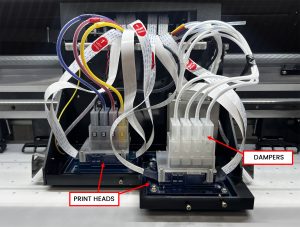
If you have completely missing channels you need to identify if the cause of the issue is coming from below or above the print head.
Check the capping station is pumping cleaning solution away. If it isn’t then it may require a replacement pump, as this consumable does wear overtime. This is positioned below the printhead.
If however the capping station is functioning correctly, check that the ink tanks are sufficiently filled, and check there is no build-up of ink sedimentation in the ink tanks that may prevent the ink flow. This would be classed as a problem above the printhead.
Performing an ink charge may be the way to go which is an enormously powerful head clean. At Amaya, we only suggest using this sparingly, and I would strongly advise you to check with your supplier on the recommended procedures for your machine as they may vary from model to model.
I hope these points help explain what can happen with a printhead and why it is important to follow the advice of the manufacturer to get the most out of your investment.