 Printwear & Promotion The Total Promotional Package
Following on from the previous issue, Colin Marsh, CEO of Resolute, brings the second part of his guide to producing and applying 3D faux embroidery and crystal patch.

Faux embroidery and crystal patch are additional print processes produced on a UV DTF printer using high-flex ink and special media. Once your machine is configured with the correct consumables, the main thing you’ll need to learn is how to produce the artwork.
How to achieve the ‘faux embroidery effect’ without embroidery software
Please note that this process requires Adobe Illustrator.
- Open your file in Illustrator and make sure no elements are grouped.
- Highlight your entire design.
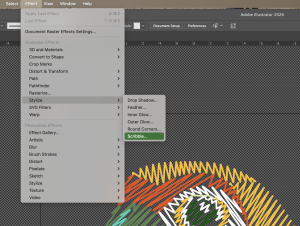
- Apply the scribble effect to your entire file. To do this, press effect in the top options bar, go down the list and find stylise. In stylised press scribble.
Once you’ve used this effect, it will be at the top of the effect menu for easy access next time.
- Now that you’ve applied the effect, you need to adjust the settings so they imitate stitches.
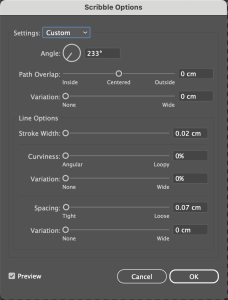 There is no universal setting that will give a perfect result for every file, however the settings below are the best place to start. The goal is a fine line scribble with visible, uniform gaps.
- Once you have the effect on your file, press okay in the options panel and deselect everything.
- Now the effect is on the artwork, you can manipulate each individual portion of artwork to help improve the realism of the effect.
To do this, select the portion you want to edit, then in the appearance tab click ‘scribble’. If you don’t have the tab open, go to window on the top options bar, find/click appearance, this will open the tab. I find it useful to have this in my side panel for easy access.
In the parrot used in the example, I’ve changed the angle to follow the natural curve of the design rather than all portions being the same to better simulate embroidery.
Portions of the design have also been divided into smaller sections by using the knife tool. This allows better control of the settings to better simulate embroidery. If you look closely at the yellow section that starts at the head you can see the ‘stitch’ angle changes. That is where the portion was split, allowing those angles to be different.
I find the best way to do this is by dragging your chosen portion away from the rest of your design to avoid accidentally splitting the rest your design.
Once you are happy with your design, save it in an editable format so that you can go back and make any changes. A press quality PDF or Ai file is okay for this.
After the effect has been applied
It is always best to print a sample before finalising the design, rather than trusting the preview on screen. Often, the lines created by the effect are too close together in the artwork. When the file prints the lines can merge into one, removing the defined edge of the ‘stitches’. So when making your artwork, leave slightly bigger gaps than you might think are required.
Top Tip: if you’re struggling to get sharp/defined lines check your printer alignment. Some machines will only be able to produce the faux embroidery effect by printing uni-direction.
Print and apply a sample of your file before going any further.
If you’re not happy with how your file printed reopen the file you saved and alter the effect.
Once you’re happy with the printed outcome reopen your artwork and save a copy. In this copy you need to expand the design. This will stop the scribble effect changing if you change the size/orientation.
Once you’ve expanded you won’t be able to change the artwork so it’s important to always save an unexpanded version.
To do this:
- Highlight the entire design.
- Go to ‘object’ on the top options bar, find/ press ‘expand appearance’.
- Highlight the design again.
- Go back to ‘object’ but this time press ‘expand’.
- Now save your file in your preferred format, this is usually a press quality PDF.

Crytal Patch
Crystal patch can be printed with or without a white underbase, depending on the substrate its being applied to. Traditional UV DTF media is used for cold application, faux embroidery media is used for heat press application. Both require a special high flex UV ink.