 Printwear & Promotion The Total Promotional Package
To ensure your prints are flawless, it may be worth looking beyond the physical print. Sometimes all problems can be solved before you even send the job away by making sure all settings are right in the creation software. Beppe Quaglia, CEO and founder of Virus Inks, explains.
 When a DTF print comes out wrong, the machine is almost always the first suspect. But anyone who works with this technology every day knows the most delicate part of the process begins much earlier, at the screen.
A badly prepared file gives no machine a fighting chance, however well calibrated it is. Here are the seven rules that really make the difference between a file that’s ready for production and one that will come straight back.
- Work at actual size, at 300 DPI
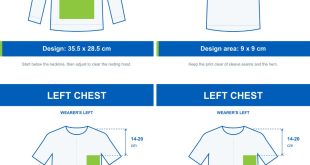
The first mistake is rarely about printing – it’s about canvas setup. Many files reach the right resolution on the designer’s screen but are calculated at a size that differs from the final print size. Set the garment’s exact dimensions before you start designing, not afterwards: Enlarging a smaller file at the export stage always produces blurred edges and lost detail, no matter how good the printer is.
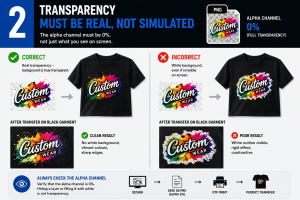
- Transparency must be real, not simulated
 Hiding a layer or filling it with white is not the same as making it transparent: To the RIP, that white is a genuine command, and the result is a rigid, unattractive block rather than a clean background. Always check that the alpha channel reads 0%, not how it looks on screen – this is the single most common reason transfers get rejected at first inspection.
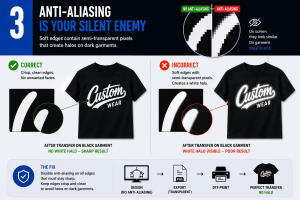
- Anti-aliasing is your silent enemy
The soft edges software applies automatically to smooth contours on screen contain semi-transparent pixels. The RIP reads these as areas to cover, producing that faint white halo often visible on dark substrates. Crisp, clean edges, free of unintended fades at the margins, stop the problem at the source.
- Understand how the white under base is generated
 In most workflows, the white underbase is generated automatically by the RIP beneath every coloured area. It’s rarely created by hand, but it does need to be understood. A slight choke of 1–4px prevents a minor registration shift between the colour layer and the white layer from leaving a thin white line at the edges. Applying it automatically across the whole file, however, risks losing fine detail and small text: It needs to be calibrated, not set once and forgotten.
- Colour space is not what you see on your monitor
Designing in RGB and trusting what appears on screen almost always leads to disappointment once printed. The file must be converted into the colour space your RIP works in, with the correct ICC profile embedded – only then do oranges, bright greens and deep blacks stay faithful from screen to substrate. If that profile isn’t already documented in your workflow, get it from your pre-press or production team before starting the job. This is information that should circulate internally, not be reverse-engineered by trial and error on every file.
-
 Vector where precision matters, raster where detail matters
Logos, text and geometric shapes should stay vector for as long as possible, with fonts converted to outlines before export, to guarantee crisp edges at any size. Photos and gradients remain raster but should be handled with dithering to avoid visible colour banding across gradual tonal shifts – a detail that separates an amateur file from one that’s genuinely production-ready.
- Hand the machine a clean file, in the right format
High-resolution transparent PNG, or PDF/TIFF for more complex jobs, remain the most reliable standards – JPEG, with its compression, should never be used as a final file. Crop the design tightly, with no unnecessary margins, to make the best use of space on the gang sheet, and always pass the file on with its dimensions, DPI and underbase notes attached: When the production team receives this information upfront, they generate fewer rejects – and turn the job around faster.
The quality of a DTF transfer is decided largely before printing even begins. Spending an extra 10 minutes on file preparation costs far less than a batch rejected after the first wash.