 Printwear & Promotion The Total Promotional Package
The age-old saying, measure twice, do it once. It works for all walks of life, showing that precision is key. And it is the same for Dye sublimation as Beppe Quaglia, CEO and president of Virus Inks, explains.
Sublimation printing rewards precision and punishes guesswork. Whether you are troubleshooting a persistent defect or looking to tighten your production workflow, these are the seven areas where professional operators most commonly find margin for improvement.
- Your ink viscosity may be costing you heads

Not all sublimation inks are compatible with all print heads, even when marketed as such. Epson i3200 heads require an ink viscosity between seven and 12 mPa·s at 25°C; Ricoh Gen5 heads require eight to 14 mPa·s. Out-of-specification viscosity – even marginally – causes drop satellites, inconsistent droplet weight and accelerated head wear.
Before switching suppliers, always request the rheological data sheet and the viscosity/temperature curve. It is a two-minute check that can save a four-figure amount in replacement costs.
- Transfer paper grammage is not a detail it is a process decision
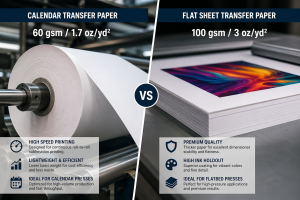
Papers between 55 and 70gsm transfer quickly and suit high-volume calendar press production. Papers at 90 to 105gsm offer superior dimensional stability for flat presses with manual positioning.
The coating weight – not the grammage alone – determines how much dye remains available at the surface for sublimation. An overly absorbent coating gives flat, muted output; an insufficiently absorbent one causes dot bleeding. Match paper to your specific printer/ink combination, not to price point.
- Ghosting is rarely a pressure problem

The faint double image that appears on finished garments is caused in most cases by paper micro-displacement during press opening or garment lift, not by incorrect pressure or dwell time. Practical fixes: tape all four edges with high-temperature tape, condition paper at room temperature before use in humid environments (above 65% RH), and on flat presses, wait 3 to 5 seconds after platen opening before removing the garment.
- Calibrate your RIP – do not just use the presets
Two calibration steps make an outsized difference to output
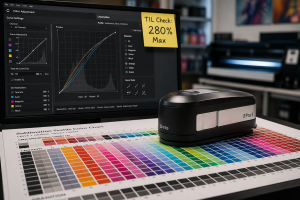
quality. First, establish your Total Ink Limit (TIL) for every printer/ink/paper combination: above 280–300%, coating saturation causes bleeding; below 200%, gamut is compressed, and shadow tones become flat. Second, run a linearisation procedure with a spectrophotometer. It takes 30 to 45 minutes and guarantees that a 50% tone value in your file produces 50% density on fabric – the foundation of repeatable colour across runs.
- Sportswear requires a separate production protocol
Fabrics with more than 10% elastane should be processed at 5 to 8°C below your standard polyester temperature: Elastane yellows and degrades with prolonged exposure above
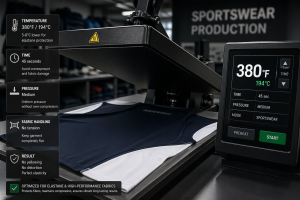
200°C. More critically, never position stretch fabrics under tension on the press – image distortion is the immediate consequence.
Also, check whether the fabric carries a DWR (Durable Water Repellent) finish: Hydrophobic surface treatments directly impede dye penetration and must be verified with the fabric supplier before committing to production.
- Control your environment, or it will control your quality
The optimum operating range for most sublimation printers is 20

to 25°C and 45 to 65% relative humidity. Below 40% RH, piezoelectric heads clog with increasing frequency.
Above 70% RH, transfer paper absorbs ambient moisture, and drying performance deteriorates. A data-logging digital thermo-hygrometer costs between £25 and £70 and transforms quality variation from a mystery into a manageable, documented variable.
- Calculate cost per m/sq properly – not just ink and paper
A full cost model must include: actual ink consumption at your

average job coverage (8–14ml/m sq for high-coverage work), transfer paper including calibration waste (typically 8–15% above net consumption), energy (a 6kW flat press running eight hours draws 48kWh), amortised print head replacement, and the hourly cost of downtime attributed to maintenance cycles.
Operators who account for all these variables typically find their real cost per m/sq is 20–35% higher than their simplified estimate – a gap that, unaddressed, quietly erodes margin on every job.
Professional sublimation does not accommodate approximation. Treat every variable as part of a managed system, and the results – in quality, consistency and margin – will reflect it.